
Managing users, groups, and aliases across multiple systems is one of the most time-consuming parts of email security. To eliminate that friction, we’re excited to introduce Microsoft 365 Directory Sync for MXGuardian.
With this new feature, you can add a domain directly from Microsoft 365 and keep it automatically synchronized — no CSVs, no manual cleanup, and no drift over time.
What Microsoft 365 Directory Sync Does
When you connect a domain from Microsoft 365 to MXGuardian:
- All users, groups, and aliases are synchronized automatically
- Changes made in Microsoft 365 stay in sync with MXGuardian
- Deleted users are removed automatically
- Aliases and distribution lists are detected correctly
- You are not charged for groups or aliases — only actual users
The result: accurate protection, accurate billing, and far less administrative overhead.
How to Add a Domain from Microsoft 365
Adding a domain takes just a few clicks.
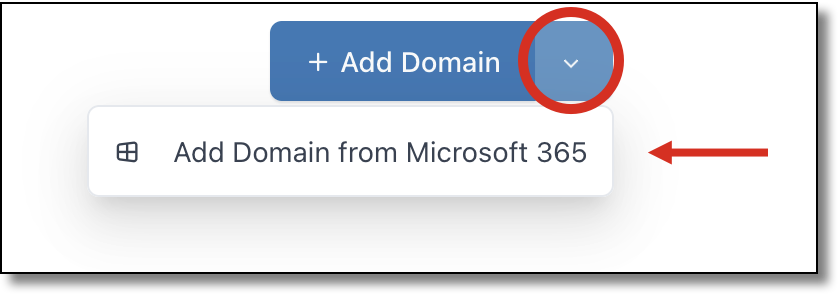
- From the Domains page, click the down arrow next to Add Domain
- Select Add Domain from Microsoft 365
- Log in to your Microsoft 365 tenant and accept the requested permissions
- You’ll see a list of domains in your tenant
- Select the domain you want to add and click Add Selected Domain
That’s it. The domain is added to MXGuardian and immediately synchronized.
What Gets Synchronized
Once connected, MXGuardian will automatically sync:
- Mailbox users
- Distribution lists and mail-enabled groups
- Email aliases (including multiple aliases per user or group)
Synchronization is continuous. When you add, remove, or modify users or aliases in Microsoft 365, those changes are automatically reflected in MXGuardian.
Important Notes About Sync Behavior
- One-way sync only
MXGuardian reads data from Microsoft 365 but never makes changes back. You grant read-only access to your tenant. - User management moves to Microsoft 365
Once a domain is synced, users can no longer be added or removed directly in MXGuardian. All user management happens in Microsoft 365. - No extra charges for groups or aliases
Only actual mailbox users count toward billing.
Important Setup Steps (Mail Flow)
Microsoft 365 Directory Sync handles identity synchronization, but mail flow changes still need to be completed manually.
You will still need to:
- Create the required Exchange Online receive connector
- Update your domain’s MX records to point to MXGuardian
These steps ensure that mail flows through MXGuardian before reaching Microsoft 365.
For detailed, step-by-step instructions, please refer to our guide:
Best Practices for Microsoft 365 Exchange Online
Disconnecting a Domain
You can stop synchronization at any time.
- Go to the Domain Settings page
- Click Stop Sync
The domain will remain in MXGuardian, but it will no longer be synchronized with Microsoft 365. From that point on, you can manage users manually again if needed.
Already Have the Domain in MXGuardian?
No problem.
If a domain already exists in MXGuardian, you do not need to delete it first. When you add it using Add Domain from Microsoft 365, the domain will be seamlessly converted into a synchronized domain.
Pricing and Availability
- Professional plan: Included at no additional cost
- Standard plan: Upgrade to Professional to enable Microsoft 365 sync
Why We Built This
This feature was designed to remove one of the biggest sources of friction in email security: keeping identity data in sync.
By letting Microsoft 365 remain the source of truth, MXGuardian can focus on what it does best — protecting your email — while reducing administrative work and eliminating errors caused by stale data.
If you’d like help enabling Microsoft 365 Directory Sync or have questions about how it works in your environment, feel free to reach out. We’re happy to help you get started.